

Hey everyone, recently EU players have been getting a lot of 900002 (90k) errors on Balmung. I have been using pingzapper and found it has really helped not only with the disconnects, but by making my loading much easier and I thought I should make a guide on how to set it up.
Original Post: http://lynto-amariyo.tumblr.com/post/162647182285/constant-90002-errors-for-non-american-players-on
Download link: https://pingzapper.com/download
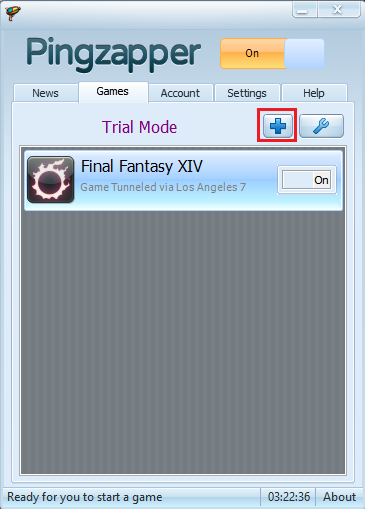
After registering for a trial and installing pingzapper, you’ll need to press the plus icon on the main interface.
When you open this, you will see a list of games. Final Fantasy XIV should already be an option in the list, in the screenshot below, because I have already added it, it doesn’t show, but mine was near the top.
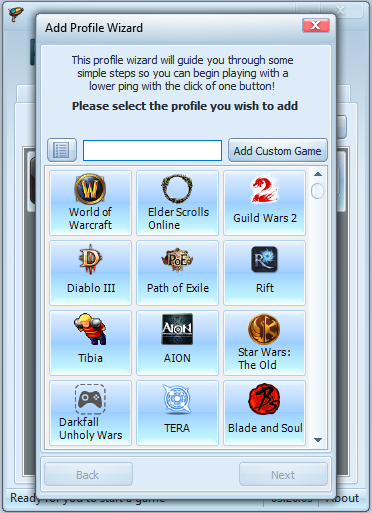
Once chosen click next. It should now ask you to find the location path and for this, we want the ffxivboot.exe as the directory. If you have installed FFXIV by default, it should be at the follow link (you can copy and paste this in)
C:Program Files (x86)SquareEnixFINAL FANTASY XIV – A Realm Rebornbootffxivboot.exe
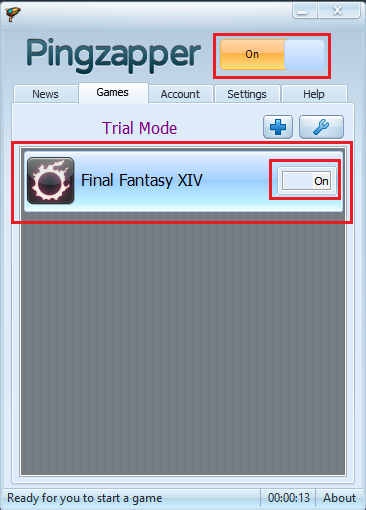
Just remember to change the directory to whichever drive you have the game installed to. When this is done, click next. It will now ask you to pick a server location. The choice depends on the location of the game server you play on, not where you live. So in this instance, we are going to use US West Coast. Once this is done, you can finish the setup. Now you need to make sure the FFXIV icon is set to on in the little window and the big on button at the top is set to on. From now on, you MUST run FFXIV by double clicking it from pingzapper, otherwise pingzapper will not work.
Hopefully this helps people who have been having issues. If you have any questions, just let me know and I will be more than willing to help if I can. Make sure to share this around so that people can work out how to fix the issue.
 Lyn'to's Sanctuary